 qplanner
Wallpaper
Wallpaper and work to bring you a smoother summer experience.
Wallpaper
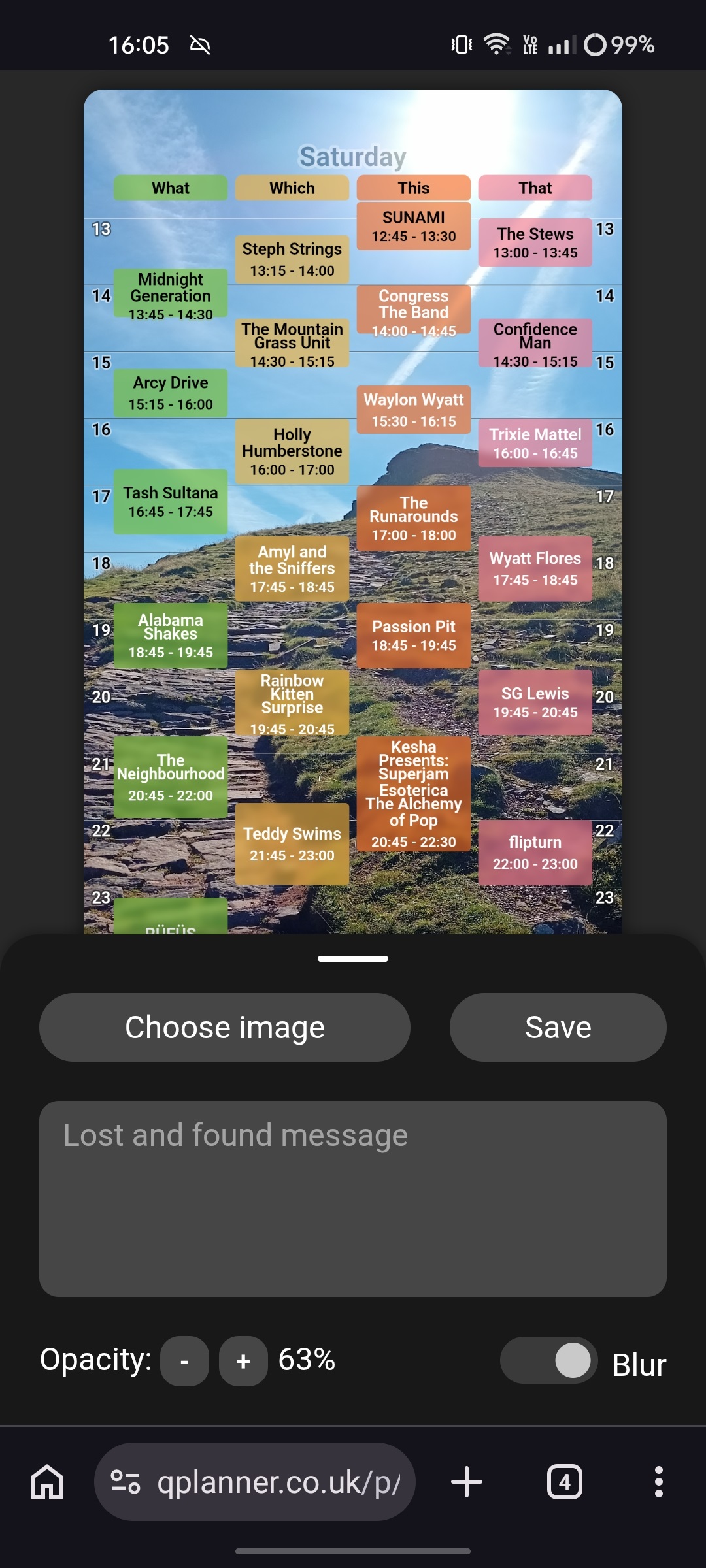
Why unlock your phone to check the stage times, when they could just be your lock screen image?
It's a simple little thing really, but I think it might be handy.
Let me know if you try it out.
This feature is only accessible on mobile/small screen devices.
It shows the first 4 or so stages (It depends on the width of your screen), of whichever day you're currently viewing.
Performances allow their text to overflow out of the bottom, to try and maximise the amount of information that can be displayed.
I also crop the start/end times of the day, so any empty space is removed.
If you tap the preview you'll see two white bars appear. You can drag these to resize the start and end of the overlay.
Using this you can make sure nothing gets cut off by anything at the top or bottom of your lock screen, regardless of what phone you have.
If you have something obstructing in the middle, then I can't help you.
Current features/options:
Image select
I'd recommend taking a photo of you and your friends, so if you lose your phone, people can easily verify it's yours.
But you don't have to do that. Just pick whatever your current lock screen image is if you want.
All of the text displayed over the image will automatically pick either black or white, to provide the strongest contrast.
Lost and found message
You can add a note here, with your name, and the names + numbers of some of your friends.
Or you could write some of your daily plans.
That space is yours, do as you please.
Opacity
This affects the coloured boxes the performances are in. You can make them completely solid, for strong readability. Or transparent. Whatever feels right, and works best with your background image.
Colour
Switches to a colour picker where you can set the colour used for all stages & performances.
The colour picker features a colour wheel, to select the hue, and two sliders, for saturation and lightness.
This feature is great for helping the stage times either blend in, or stand out against, your chosen photo.
If you have Hide unselected enabled then selected performances will use this colour.
Tapping Remove colour will revert back to the default planner colours.
Blur
This effect blurs behind performance boxes, and other text.
It's pleasing on the eye, and makes the background smoother, which can help readability.
Hide unselected
This option will only display performances that you've selected, and hide stages with no selected performances on them.
It works in a similar fashion the print option, and can be used as a companion to the Filter event menu.
Right now it doesn't display stage closures, overlaps (Where more than 1 performance happens on a stage at once), or info.
I might add a font size option, or some other small options.
Let me know if there's anything I should tweak, or add.
Other changes
It's a smaller bunch of changes today, but fans of printing will be pleased by them.
- [Viewing] Fixed a stage re-ordering bug
- [Viewing] Re-enabled the
hideprint option, which hides performances that haven't been selected - [Viewing] Added a swipe handle to the side of drawers on mobile. This is a hint to help people close them
- [Viewing] Replaced the browsers attempt at inbuilt printing of the page with a message directing users to the Print button
- [PDF] Fixed 12 hour times. That option was still being sent, but the parameter name had become decoupled from the expected named
- [PDF] Fixed some PDF generation errors that I'd accidentally introduced
- [Creator] Fixed a different, more annoying, stage re-ordering bug
Android app
I still need more testers before things can move forward.
Once there's enough people I'll only ask for a few minutes of your time spread across 2 weeks.
Learn more, and join the test here.
What's next?
More polish for the wallpaper feature, and then surely the app.