 qplanner
Summer 2026 upgrades
Features and fixes to bring you a better summer experience!
New features
Stage Re-ordering
Available via the Event Filter drawer, along with hiding days and stages, you can now put them in the order that matters most to you.
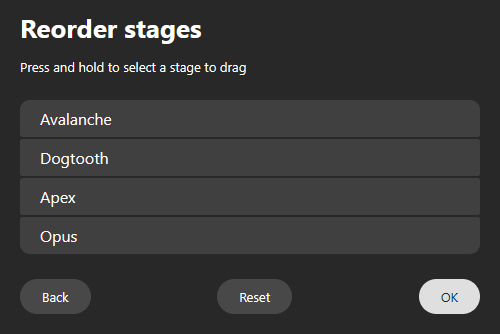
It's very easy to use. Just tap and drag. Then press OK.
For huge events that need to scroll the list, like Glastonbury, you'll have to press and hold for a moment before you can drag a stage.
When printing, PDFs will also be displayed using your chosen order.
Accessibility
Due to the tricky layout of a planner I hadn't given much thought to keyboard usage, and the accessibility issues it presents.
I will be upfront and say I still haven't given this enough attention, but I have now made a start.
Stage titles, which when pressed display stage info, and a plain times listing, are now buttons, and can now be opened with the keyboard.
Performances are buttons, too. And I've had a stab at making it so you can tab down through each stage's performances, and then on to the neighbouring stage.
There may be a tiny bit of weirdness in the implementation, and annoyingly you may have to use a pointer to get focus back to where you want it.
Stage info, stage overlaps, and stage closure are currently not included in the tab handling.
I've also added ARIA tags to a couple of places that benefit from its usage.
Selection unlocker pop-up
If you've ever forgotten that you've locked your selection, to protect it from modification, or simply enabled the feature without realising what it does, you may have found yourself feeling frustrated that your 24th tap in quick succession didn't break the spell stopping you from selecting a band.
It genuinely happened to me the other day, so I thought I'd make something to help.
When the selection is locked, and you quickly tap a couple of times on the same spot, a little pop-up will appear letting you know what's going on.
And as helpful bonus, there's a button on the right to unlock it right away.
(The code for it is a bit swish, but you'd need a good eye to know why)
I've also change the padlock icon, so the unlocked state is a lot more obvious.
The events calendar page
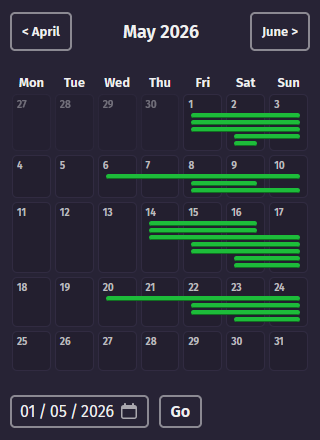
It's a bit naff, but handy.
Much like any other calendar, this shows blocks of lines where events are scheduled.
On desktop it also displays the name of each event in the lines.
You can click on a date to see a list of what's on, and then click again to view the planner.
At the top there are two buttons for navigating to the previous or next month.
And at the bottom you can pick a month/year (day is ignored), and then click Go.
It exists because I wanted an easy way to see what planners I've had during the same time in previous years, in the hope that somebody then makes a planner for any missing events for this year.
Let me know if there are any obvious improvements I could make to it.
Bug fixes and changes
There's a couple of gems in here.
Viewing a planner:
- Correctly resize stage times on mobile when using 12 hour clock (24hr was already handled)
- Fix handling inset performances on mobile
- Mostly fix some display issues with the new logo system
- Fix showing the full performance text on hover (Also available when tabbing through performances)
- Adjust some button text, to explain their usage a little better
- Added reduced motion handling for toggling a performance
- Add toggle bounce when toggling in expanded stage overlaps
- Improve performance height transition when animating between granularities
- When viewing the most recent history of a planner, treat it the same as viewing the live version, which it is
- Improve the artist list search box on desktop and mobile
- Improve the look of the selection padlock button on desktop
- Tweak some stage style related CSS
- Avoid animating performances into position on page load if not using 15 minute granularity
- Stop duplicate panels from appearing if you double click
- Fix handling events longer than 12 days using unstyled days
- Stop users from scrolling the stage titles out of sync from the rest of the stages
- Remove unused artists from the artist list
Update: I've done a few more tweaks:
- Add swiping down to dismiss the scrollable artist list on mobile web, when it's at the top of the list
- Preload icon font to improve page load speed
- Add lang tags to the page. Some may need tweaking.
- Improved interacting fading of pop-up's page darkening
- Changed the direction arrow toggle animation
- Change the look of checkboxes on mobile (Is this ok?)
Creator:
- Fix a raft of annoying performance adjustment bugs that have plagued the site for a long time!!!
This is bigger than it seems. These bugs were terribly frustrating, and now they're resolved! - Logos: Fix saving a blank End Date after previously setting one for a logo
- Logos: Reload logo thumbnails after updating a logo
- Logos: Add automatic image cropping to reduce white space (Toggle this feature with
c) - Small stage visibility fixes
- Minor invisible page structure changes
- Rerender the planner after bulk removal of artists
- Move the Stage Styles button out of the Global Style window
- Fix loading planners with the column width set to 0
- Fix leaving a comment on a planner
- Import stage times: Try and re-render after converting 12 hour times into 24
- Fix the default day colours for events with more than 12 days
- Fix being able to force overwriting a planner when the event date has changed
Website:
- Add a new favicon across the site!
- Fix some page caching and performance issues on the main website
- Correctly theme native controls light or dark depending on the main website theme you're using
- Fix the sitemap.xml
- Tweak how edits are displayed on narrower displays (wider than mobile)
- Adjust how crawlers (search engines) should handle some pages
- Fixed the Report planner/Send feedback pages, so now feedback should actually be saved.
- Change the clock icon on the website
I love feedback, and get virtually none. So please do let me know what you think!
PDF:
- Added stage re-ordering support
iCal:
- Reject requests for line-up only planners
What's next?
Well I've also been working on the phone app, a tiny bit.
I'm in desperate need of testers!
Please get in touch if you own an android phone and wish to help!
It has performance notifications, surely you want those.
I also need to spend a lot of time upgrading the underlying framework of the app, this will take a while, and likely causes grey hairs.
Other than the phone app, I still have a lot of things that need improving or adding.