 qplanner
Grouping planners together as Events
It's been a while since the last update, and as summer draws to a close, lets see what changes have come to qplanner.
- Events
- Request a fest
- New menus in the creator
- New visual options for planners
- Preset Event Filters
- Other changes
- Android app
- What's next?
Events
qplanner used to have a nice, yet flawed, system for listing related planners.
You'd have to edit each planner to add every other related planner, which is tedious at best.
So I disabled that, and it was lost to time. (Not really, it's quietly gnawed at me.)
Anyway, Events are a way of grouping related planners together, along with some basic event information.
Right now an event can have:
- Title
- Address
- Country Code
- Latitude and longitude
- Website
- Description
- Genres
- Inactive
Moderators can prevent editing the event by locking them, along with being able to merge one event into another.
I hope to offer some of this information inside the creator, to help speed up making planners for future events.
Viewing a planner in desktop mode can already have an Event Info section in the side bar, with related planners.
How you can help improve events
All of the current events were automatically generated, using planner titles to group them.
So the groups only have a title, and a collection of planners.
I did try to automatically generate the top 10 genres for each event, but I think that failed for many due to a lack of artist data.
So please help flesh out the data of any events that interest you.
Another issue is that since group creation was based on planner titles, there are some duplicate events with slightly different names.
If you spot any of these groups then I'd appreciate a quick note, or something, so I can merge them.
If, instead, you want to just remove all of the associated planners from one group, and add them to the correct one, then that's fine.
Request a fest
I know, I know, you don't have time to make a planner for that festival.
Or the creator isn't suitable for use on mobile, so you just can't.
Just for you, I've added a simple new page for requesting a planner.
You just have to enter the festival name, and provide a link to the stage times (if possible)
New menus in the creator
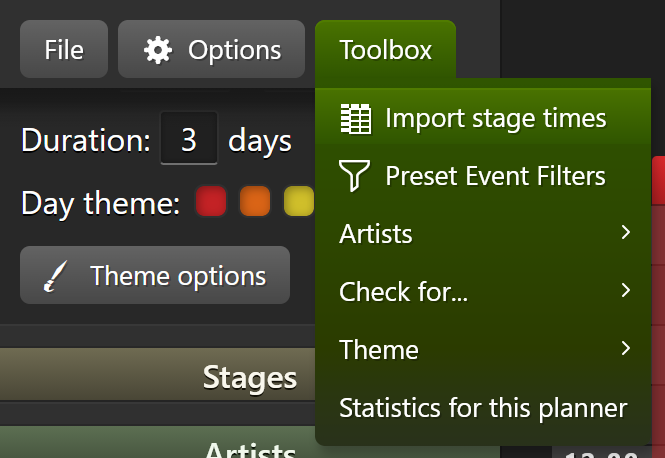
I've been tacking on new buttons in various places for too long.
An ugly heap of buttons is nobody's friend.
So I've switched them for colourful menus.
This means the Toolbox has moved into its own menu, with submenus.
The Import stage times button has been moved into this menu as well.
I've also tidied up mass of theme buttons into the Theme options menu.
The menus are keyboard friendly, well you can tab through them.
New visual options for planners
Stage gap
The other day I checked the original version of what became qplanner (You can check it out here), and I noticed that the gap between stages was much larger than I remembered.
So to celebrate that uninteresting revelation you can now set the stage gap, in the creator.
You have a choice of:
- None (0px)
- Tiny (1px)
- Small (5px)
- Normal (10px, this is the default)
- Large (25px, the sized used in 2009)
The option is available via Theme options, under either Stage style or Global colour theme.
Display options
From the beginning I've been giving people control of what colours are used on a planner, along with more recent stage style options.
But throughout this I've still forced my idea of how some things should look on everyone.
The new Display options window, available from the Theme options menu, helps change this.
Right now there are 3 options, that set the default viewing experience for users:
-
Use gradients
Are flat colours more in keeping with your events visual style? Here you go, disable them. -
High contrast text
Has the default high contrast text been ruining the subtleties of your design?
For this one, please make sure you've actually chosen good colours before turning it off. -
DISPLAY TEXT IN UPPERCASE
An eternal favourite of some events.
The artist data stays correctly formatted, but it's displayed in uppercase.
These options are reflected across the mobile and desktop web views, along with PDFs* (*PDFs don't have high contrast text support anyway)
Users can override these settings in the options menus, and those settings persist and override these settings across all planners.
Preset Event Filters
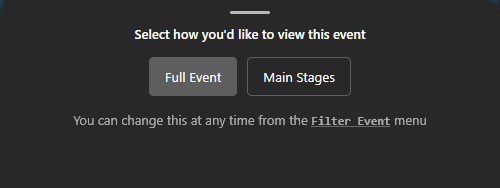
Filtering is now a solid part of qplanner, after being recently improved with the companion stage re-ordering system.
I thought it would be nice to give editors a way of offering named presets for users to pick from.
This means there doesn't need to be 2 separate planners for large events (1 for the entire event, and another for just the main area)
After being shown the initial filter selection, the presets can be accessed from the Event Filters menu:
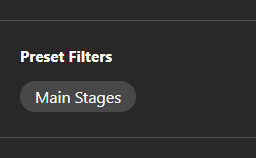
Creating and editing filters
For editors, the Preset Event Filters window is available via the Toolbox menu.
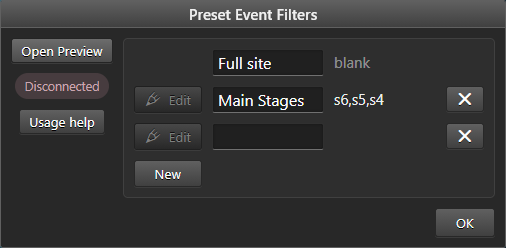
To get started, click the Open Preview button. This opens a new tab, and in the creator you'll see Connected in green.
This means the two pages can talk to each other, and you're ready to select a filter to edit.
Now click Edit, and the button will go blue to indicate it's being edited.
You can give the filter a name while you're at it. This is what users will see.
Switch back to the preview, and filter the planner to your liking.
Once you're happy, click the Send Filter to Creator button, at the bottom of the Event Filter menu.
Once you're happy with everything, just press accept.
Other changes
Viewing a planner
- Fix panning on mobile having a sudden initial jump
- Add artist image as background of mobile hold info
- Fixed stub planners rendering empty text
- Build artist lists in chunks to improve performance, especially on mobile
- Fixed a contrast colour issue with day slat colours
- Fix an issue when requesting artist info
- Stopped trying to fetch remote artist info when it's set to false
- Small fixes and improvements to wallpaper
- Optimise and polished several areas of CSS
- Minor page building optimisation
Website
- Website form handling refresh
- Fiddled with some icons on the website and pdfs
- Potentially improve searching on the website
- Added a suite of tests to try and prevent site errors, along with a smattering of fixes for minor issues detected
Creator
- Don't reset the scroll pos when switching day/stage in stage theme
- Added press
Escto cancel when moving a performance around - Fixed importing stage times with inconsistent casing for stage names
- Fixed previewing planner PDFs from the creator
- Slowly fetch information on each artist listed in a planner after it's saved to the website
- Fixed checking for planner conversation messages in the creator
- Fix preset colours displaying as grey in the creator
- Fixed accidentally mutating stage themes in the creator
- Fixed a couple of stage time importing UI bugs
Android app
I still need more testers before things can move forward.
Once there's enough people I'll only ask for a few minutes of your time spread across 2 weeks.
Learn more, and join the test here.
I also need to rebuild the app, because of changes to the framework it uses, which requires motivation.
What's next?
More polish for the wallpaper feature, and then surely the app.